<?xml version="1.0" encoding="utf-8"?><feed xmlns="http://www.w3.org/2005/Atom" xml:lang="zh-Hant"><generator uri="https://jekyllrb.com/" version="3.10.0">Jekyll</generator><link href="https://ryangtr.github.io/feed.xml" rel="self" type="application/atom+xml" /><link href="https://ryangtr.github.io/" rel="alternate" type="text/html" hreflang="zh-Hant" /><updated>2026-08-27T16:45:41+08:00</updated><id>https://ryangtr.github.io/feed.xml</id><title type="html">Ryan 的交付鏈筆記</title><subtitle>OpenShift／Tekton／Harbor／供應鏈安全——在自己的筆電上把企業交付鏈拆開來看。</subtitle><author><name>Ryan Chen</name></author><entry><title type="html">SBOM 有了，還是答不出「誰在用」：四個實測</title><link href="https://ryangtr.github.io/2026/08/sbom-that-cannot-answer-who-uses-it/" rel="alternate" type="text/html" title="SBOM 有了，還是答不出「誰在用」：四個實測" /><published>2026-08-27T17:00:00+08:00</published><updated>2026-08-27T17:00:00+08:00</updated><id>https://ryangtr.github.io/2026/08/sbom-that-cannot-answer-who-uses-it</id><content type="html" xml:base="https://ryangtr.github.io/2026/08/sbom-that-cannot-answer-who-uses-it/"><![CDATA[<p>上一篇講 OpenShift AI 驗收時全綠但四件事是錯的。這篇換個對象：<strong>SBOM</strong>。</p>

<p>起點是一個很具體的問題：</p>

<blockquote>
  <p>出了一個 CVE，我要在幾分鐘內回答「本行哪些系統在用這個套件、哪一版、部署到哪」。</p>
</blockquote>

<p>有 SBOM 不等於答得出來。我花了兩天把一條完整的鏈接起來——
pipeline 產成品 → 算 digest → SCA 掃描（Mend SaaS）→ 依賴樹入帳 → 用 PURL 反查——
每一步都跑成功。然後逐條驗，四件事是錯的。<strong>其中兩件是我自己算錯的</strong>，那兩件反而更值得寫。</p>

<hr />

<h2 id="一能寫能讀就是不能查">一、能寫、能讀，就是不能查</h2>

<p>要回答「誰在用」，前提是成品身分（image digest）要能綁在掃描紀錄上。
Mend 支援 project tag，於是我掃描時帶上：</p>

<div class="language-bash highlighter-rouge"><div class="highlight"><pre class="highlight"><code>mend dep <span class="nt">--update</span> <span class="nt">--tags</span> artifactDigest:&lt;sha256&gt;
</code></pre></div></div>

<p>（順帶一提，分隔符是 <code class="language-plaintext highlighter-rouge">:</code> 不是 <code class="language-plaintext highlighter-rouge">=</code>，而且 <code class="language-plaintext highlighter-rouge">--tags</code> 與 <code class="language-plaintext highlighter-rouge">--local</code> 互斥——
<strong>要打標籤就必須上傳，純本機掃描拿不到標籤</strong>。）</p>

<p>寫入成功。讀回來也成功：</p>

<div class="language-json highlighter-rouge"><div class="highlight"><pre class="highlight"><code><span class="p">[{</span><span class="nl">"key"</span><span class="p">:</span><span class="w"> </span><span class="s2">"artifactDigest"</span><span class="p">,</span><span class="w"> </span><span class="nl">"value"</span><span class="p">:</span><span class="w"> </span><span class="s2">"50cd47b9…"</span><span class="p">}]</span><span class="w">
</span></code></pre></div></div>

<p>到這裡我差點就寫「可行」。幸好多做了一步——<strong>拿一個不存在的值去查</strong>：</p>

<table>
  <thead>
    <tr>
      <th>查詢</th>
      <th>回傳專案數</th>
    </tr>
  </thead>
  <tbody>
    <tr>
      <td>不帶任何參數（基準）</td>
      <td>N</td>
    </tr>
    <tr>
      <td><code class="language-plaintext highlighter-rouge">?tag=artifactDigest:&lt;真實值&gt;</code></td>
      <td>N</td>
    </tr>
    <tr>
      <td><code class="language-plaintext highlighter-rouge">?tag=artifactDigest:ZZZZ_NOT_EXIST</code></td>
      <td>N</td>
    </tr>
    <tr>
      <td><code class="language-plaintext highlighter-rouge">?tag=@@@@</code>（語法根本是錯的）</td>
      <td>N</td>
    </tr>
  </tbody>
</table>

<p>四個一模一樣，<strong>連語法錯誤都不報錯</strong>。</p>

<p>（測的是 Platform API v2.0 <code class="language-plaintext highlighter-rouge">GET /orgs/{org}/projects</code> 的 <code class="language-plaintext highlighter-rouge">tag</code>／<code class="language-plaintext highlighter-rouge">tags</code> 參數，2026-08 實測。
不排除另有查詢途徑，但至少不是最明顯的那一條。）</p>

<p>這不是「查不到」，是<strong>根本沒在查</strong>——參數被整個忽略了。
只測真實值那一次，會百分之百誤判成成功，因為它確實回了一堆資料。</p>

<blockquote>
  <p><strong>教訓</strong>：任何「可以用 X 查詢」的宣稱，驗收方式不是「用真的 X 查一次看有沒有結果」，
是<strong>用一個保證不存在的 X 查一次，看結果有沒有變</strong>。沒變就是假的。</p>

  <p>對這個案子的結論很硬：tag 是<strong>註記</strong>，不是<strong>鍵</strong>。
digest 寫得進去、看得到，但沒辦法拿它反查，那它就只是個顯示欄位。</p>
</blockquote>

<hr />

<h2 id="二direct-和-transitive我用錯規則分了一遍">二、direct 和 transitive，我用錯規則分了一遍</h2>

<p>帳本要分「直接相依」和「被別人帶進來的」，因為兩者的處置完全不同：
直接相依你改得動 manifest，遞移相依你只能等上游或換套件。</p>

<p>我自己寫的判斷規則是：<strong>在依賴樹裡曾經當過別人的 parent，就算遞移</strong>。
跑出來 direct 28、transitive 23。</p>

<p>同一個專案，Mend API 給的答案是 <strong>direct 2、transitive 49</strong>。</p>

<p>差了一個數量級。錯的是我：<strong>direct 的定義不是「在樹的哪一層」，
是「有沒有寫在 manifest 的頂層宣告裡」</strong>。
一個套件可以同時是頂層宣告、又是別人的 parent，我的規則把它判成遞移。</p>

<blockquote>
  <p><strong>教訓</strong>：同一件事有兩個來源時，<strong>先對帳再相信自己算的那個</strong>。
我如果沒去拉 API 交叉比對，這個數字會一路帶到報表上，而且看起來完全合理。</p>
</blockquote>

<hr />

<h2 id="三誠實欄位算錯比沒有誠實欄位更糟">三、誠實欄位算錯，比沒有誠實欄位更糟</h2>

<p>我在全量匯出的 metadata 裡放了幾個「這份資料自己的品質」欄位，
本意是不要讓人以為涵蓋率 100%：</p>

<div class="language-plaintext highlighter-rouge"><div class="highlight"><pre class="highlight"><code>artifacts=36  artifactsWithoutDigest=6  artifactsWithoutDepGraph=28
</code></pre></div></div>

<p>第一版跑出來是 <code class="language-plaintext highlighter-rouge">artifactsWithoutDepGraph=36</code>——<strong>36 之 36，全部都沒有依賴圖</strong>。</p>

<p>但我明明親手把 80 條依賴邊灌進去過。去看程式碼，錯在我拿成品的 <code class="language-plaintext highlighter-rouge">artifact_id</code>
去比對一個裝 PURL 的集合——兩種東西永遠比不中，所以答案恆等於「全部都沒有」。</p>

<p>這個 bug 的性質值得說清楚：它不會讓資料變少，<strong>它會讓一個宣稱自己誠實的欄位說謊</strong>。
而且方向是「把自己講得更爛」，所以看起來像是保守、不像是錯——最不容易被抓的那種。</p>

<blockquote>
  <p><strong>教訓</strong>：<strong>誠實欄位本身也要測</strong>。
一個沒被測試過的品質指標，跟沒有品質指標是兩回事——後者只是缺，前者是錯誤資訊。</p>
</blockquote>

<hr />

<h2 id="四build_ref-是空的而且空在最該有的地方">四、<code class="language-plaintext highlighter-rouge">build_ref</code> 是空的，而且空在最該有的地方</h2>

<p>帳本每一筆成品都記來源：<code class="language-plaintext highlighter-rouge">intake</code>（A=pipeline 自動、B=工具匯入、C=人工填），
以及 <code class="language-plaintext highlighter-rouge">build_ref</code>（哪一次 build、哪個 commit）。</p>

<p>我抽查時發現，有幾筆 <code class="language-plaintext highlighter-rouge">intake=A</code> 的紀錄，<code class="language-plaintext highlighter-rouge">build_ref</code> 是空字串。</p>

<p><code class="language-plaintext highlighter-rouge">intake=A</code> 的意思是「這筆是 pipeline 自動入帳的，信心最高」。
而 <code class="language-plaintext highlighter-rouge">build_ref</code> 空，代表<strong>這筆最可信的紀錄，追不回是哪次 build、哪個 commit 產生的</strong>。
七段稽核鏈（成品 → 品質關卡 → 建置來源 → 原始碼）就斷在這裡。</p>

<p>更麻煩的是它不會報錯。信心等級照樣算成 high，因為我當初的規則是
「intake=A 且有 digest → high」——<strong>沒有把 <code class="language-plaintext highlighter-rouge">build_ref</code> 算進去</strong>。</p>

<blockquote>
  <p><strong>教訓</strong>：信心等級不能是「填進來的」，必須是<strong>從實際欄位推導出來的</strong>；
而推導規則要涵蓋所有讓它不可信的欄位，漏一個就會出現「高信心的斷鏈」。</p>
</blockquote>

<hr />

<h2 id="那怎麼驗才有用">那怎麼驗才有用</h2>

<p>這四條抽出來是四個可以直接套用的動作：</p>

<table>
  <thead>
    <tr>
      <th>要驗什麼</th>
      <th>沒用的驗法</th>
      <th>有用的驗法</th>
    </tr>
  </thead>
  <tbody>
    <tr>
      <td>「可以用 X 查詢」</td>
      <td>用真的 X 查一次</td>
      <td><strong>用不存在的 X 查一次，看結果變不變</strong></td>
    </tr>
    <tr>
      <td>自己算的分類</td>
      <td>看數字合不合理</td>
      <td><strong>找第二個來源算同一件事，對帳</strong></td>
    </tr>
    <tr>
      <td>涵蓋率/品質欄位</td>
      <td>相信它</td>
      <td><strong>餵一筆已知答案進去，看它報得對不對</strong></td>
    </tr>
    <tr>
      <td>「這筆資料可信」</td>
      <td>看信心等級</td>
      <td><strong>看信心是怎麼推導的，推導有沒有漏欄位</strong></td>
    </tr>
  </tbody>
</table>

<p>共同點是一樣的：<strong>成功的那次不構成證據，失敗的那次才構成證據</strong>。
一個永遠回傳結果的查詢，跟一個真的在過濾的查詢，長得一模一樣——
除非你去問它一個它應該答不出來的問題。</p>

<hr />

<p><em>本文所有數字來自我自己建的示範專案（一個 Vue 前端 + 一條 Azure Pipelines），
在筆電與雲端 CI 上都可重現。表一的 N 是同一個實際數字，與結論無關故略。
工具版本以 2026 年 8 月實測為準，廠商日後修正不在本文追蹤範圍。</em></p>]]></content><author><name>Ryan Chen</name></author><category term="sbom" /><category term="supply-chain" /><category term="sca" /><category term="cyclonedx" /><category term="verification" /><category term="acceptance" /><summary type="html"><![CDATA[把成品 digest 綁進 SCA 平台、把依賴樹入帳、把匯出打開——每一步都成功。然後逐條去驗，四件事是錯的，其中兩件是我自己算錯的。]]></summary></entry><entry><title type="html">儀表板全綠，四件事還是錯的：OpenShift AI 驗收實錄</title><link href="https://ryangtr.github.io/2026/08/four-green-lights-that-lie/" rel="alternate" type="text/html" title="儀表板全綠，四件事還是錯的：OpenShift AI 驗收實錄" /><published>2026-08-24T10:00:00+08:00</published><updated>2026-08-24T10:00:00+08:00</updated><id>https://ryangtr.github.io/2026/08/four-green-lights-that-lie</id><content type="html" xml:base="https://ryangtr.github.io/2026/08/four-green-lights-that-lie/"><![CDATA[<p>當你是驗收的人而不是安裝的人，你面對的不是「裝好了沒」，而是<strong>「裝對了嗎」</strong>。這兩個問題的差別，在於前者看畫面就能回答，後者不行。</p>

<p>我在筆電的 CRC 上把 Open Data Hub 3.5 裝起來（它是 OpenShift AI 的上游開源版，元件同源），用 KServe 把一顆自己從零訓練的小 GPT 上線，再開 Data Science Pipelines 跑一條訓練流程。全程綠燈。</p>

<p>然後我開始逐條驗證。以下四件事都是綠燈狀態下的錯誤。</p>

<hr />

<h2 id="一pod-要到-gpu不代表模型算在-gpu-上">一、pod 要到 GPU，不代表模型算在 GPU 上</h2>

<p>這是四件裡最貴的。</p>

<p>幾乎所有推論服務都有這樣一行，這是標準寫法不是壞程式：</p>

<div class="language-python highlighter-rouge"><div class="highlight"><pre class="highlight"><code><span class="n">device</span> <span class="o">=</span> <span class="s">"cuda"</span> <span class="k">if</span> <span class="n">torch</span><span class="p">.</span><span class="n">cuda</span><span class="p">.</span><span class="n">is_available</span><span class="p">()</span> <span class="k">else</span> <span class="s">"cpu"</span>
</code></pre></div></div>

<p>CUDA 掛不上時——驅動沒裝、容器沒掛 nvidia runtime、torch 裝成 CPU wheel、<code class="language-plaintext highlighter-rouge">CUDA_VISIBLE_DEVICES</code> 被清空——這行<strong>不報錯、不警告</strong>，安靜退回 CPU。服務照常啟動、readiness probe 照常變綠、推論照常回應。</p>

<p>而在 Kubernetes 這一層，pod 的 <code class="language-plaintext highlighter-rouge">resources.limits["nvidia.com/gpu"]: 1</code> 照樣成立，<strong>那張卡照樣被這個 pod 佔住不給別人用</strong>。於是你同時得到「GPU 被消耗」和「GPU 沒被使用」。</p>

<p>我做了一組對照：同一份程式碼、同一個 venv、同一個 torch（cu128 build）、同一顆模型、同一個 prompt。<strong>B 組唯一的改動是 <code class="language-plaintext highlighter-rouge">CUDA_VISIBLE_DEVICES=""</code></strong> ——這正是「容器沒把卡掛進來」在應用層的效果。兩組分開跑，先確認閒置時 GPU 是乾淨的。</p>

<table>
  <thead>
    <tr>
      <th>訊號</th>
      <th>A：真 GPU</th>
      <th>B：假 GPU</th>
      <th>分得出來？</th>
    </tr>
  </thead>
  <tbody>
    <tr>
      <td>服務啟動 / 推論結果</td>
      <td>正常</td>
      <td>正常</td>
      <td>❌</td>
    </tr>
    <tr>
      <td>延遲中位數（8 次）</td>
      <td>606 ms</td>
      <td>1520 ms</td>
      <td>⚠️ 只差 2.5 倍</td>
    </tr>
    <tr>
      <td><code class="language-plaintext highlighter-rouge">nvidia-smi</code> 使用率</td>
      <td>30%</td>
      <td>0%</td>
      <td>⚠️ 整張卡的數字</td>
    </tr>
    <tr>
      <td><strong><code class="language-plaintext highlighter-rouge">--query-compute-apps</code></strong></td>
      <td><strong><code class="language-plaintext highlighter-rouge">19826, python, 228 MiB</code></strong></td>
      <td><strong>（空）</strong></td>
      <td>✅</td>
    </tr>
  </tbody>
</table>

<p>只有最後一條分得出來：</p>

<div class="language-bash highlighter-rouge"><div class="highlight"><pre class="highlight"><code>nvidia-smi <span class="nt">--query-compute-apps</span><span class="o">=</span>pid,process_name,used_memory <span class="nt">--format</span><span class="o">=</span>csv
</code></pre></div></div>

<p>它問的是「<strong>哪個進程真的在這張卡上配了記憶體</strong>」，而這是應用程式無法自報、也不容易造假的。在叢集上就是：</p>

<div class="language-bash highlighter-rouge"><div class="highlight"><pre class="highlight"><code>oc debug node/&lt;gpu-node&gt; <span class="nt">--</span> <span class="nb">chroot</span> /host nvidia-smi <span class="se">\</span>
   <span class="nt">--query-compute-apps</span><span class="o">=</span>pid,process_name,used_memory <span class="nt">--format</span><span class="o">=</span>csv
</code></pre></div></div>

<p><strong>要在送出推論請求前後各跑一次。</strong> 沒有對照，不算證據。</p>

<p>兩個會讓你自己騙自己的陷阱：</p>

<ol>
  <li><strong>延遲比不是固定的</strong>。我這顆模型只有 8M 參數，GPU 只快 2.5 倍（模型太小，kernel launch 和資料搬運吃掉大半好處）。7B 級的模型應該是 10–50 倍。反過來說，<strong>小模型「沒快多少」不能證明沒用到 GPU</strong>。</li>
  <li><strong>顯存佔用小不代表沒用到</strong>。A 組只吃 228 MiB、使用率峰值 30%。判準是「有沒有出現在 compute-apps」，不是數字大不大。</li>
</ol>

<hr />

<h2 id="二imageid-不反映-image-從哪裡拉來">二、<code class="language-plaintext highlighter-rouge">imageID</code> 不反映 image 從哪裡拉來</h2>

<p>離線環境的核心問題是：叢集裡的每顆 image 都必須來自你的私有 registry。</p>

<p>直覺的驗法是列出所有 pod 的 <code class="language-plaintext highlighter-rouge">imageID</code> 看有沒有外部位址。我原本也是這樣寫檢查腳本的，直到我真的把一顆 image 鏡像進私有 registry、設好 <code class="language-plaintext highlighter-rouge">ImageDigestMirrorSet</code>、確認 pod 從私有 registry 起來了——然後查 <code class="language-plaintext highlighter-rouge">imageID</code>：</p>

<div class="language-plaintext highlighter-rouge"><div class="highlight"><pre class="highlight"><code>quay.io/opendatahub/odh-workbench-jupyter-datascience-cpu-py312-ubi9@sha256:6f0e6268…
</code></pre></div></div>

<p><strong>還是 quay.io。</strong> 但它確實是從私有 registry 拉的，證據有三件：Harbor 的 <code class="language-plaintext highlighter-rouge">pull_count</code> 增加了、節點的 <code class="language-plaintext highlighter-rouge">registries.conf</code> 裡那個來源標著 <code class="language-plaintext highlighter-rouge">blocked = true</code>、pod 正常 Running。原站被封鎖而 pod 起得來，只可能來自鏡像端。</p>

<p>原因很簡單但容易忽略：<code class="language-plaintext highlighter-rouge">imageID</code> 回報的是 image 的<strong>身份</strong>（來源名稱 ＋ digest），IDMS 改的是<strong>去哪裡拿</strong>，不改<strong>這是誰</strong>。</p>

<p>所以這一條要拆成兩個不同的問題：</p>

<table>
  <thead>
    <tr>
      <th>問題</th>
      <th>能用 imageID 回答嗎</th>
      <th>正確方法</th>
    </tr>
  </thead>
  <tbody>
    <tr>
      <td>哪些 image 必須進鏡像清單？</td>
      <td>✅ 可以</td>
      <td><code class="language-plaintext highlighter-rouge">imageID</code> 去重統計</td>
    </tr>
    <tr>
      <td>這些 image 實際上會不會走外網？</td>
      <td>❌ 不行</td>
      <td>看節點 <code class="language-plaintext highlighter-rouge">/etc/containers/registries.conf</code> 的 <code class="language-plaintext highlighter-rouge">blocked</code> 與 <code class="language-plaintext highlighter-rouge">mirror</code></td>
    </tr>
  </tbody>
</table>

<p>順帶一提第一個問題的答案很有意思：在一個 DataScienceCluster 顯示 Ready、dashboard 全綠的叢集上，正在跑的 pod 用了 <strong>60 顆外部 image</strong>，光元件本身就 23 顆。而 operator bundle 的 <code class="language-plaintext highlighter-rouge">relatedImages</code> 只列了 5 顆。<strong>只照 bundle 做鏡像，會裝到一半斷。</strong></p>

<p>最容易漏的是 sidecar：<code class="language-plaintext highlighter-rouge">odh-kube-rbac-proxy</code> 被注入到每個 InferenceService 的 pod 裡，不在任何「元件清單」上，但少了它模型就上不了線。</p>

<hr />

<h2 id="三鏡像設定的預設值會讓離線測試假成功">三、鏡像設定的預設值，會讓離線測試「假成功」</h2>

<p><code class="language-plaintext highlighter-rouge">ImageDigestMirrorSet</code> 有一個欄位叫 <code class="language-plaintext highlighter-rouge">mirrorSourcePolicy</code>，預設是 <code class="language-plaintext highlighter-rouge">AllowContactingSource</code>：</p>

<table>
  <thead>
    <tr>
      <th>值</th>
      <th>行為</th>
    </tr>
  </thead>
  <tbody>
    <tr>
      <td><code class="language-plaintext highlighter-rouge">AllowContactingSource</code>（預設）</td>
      <td>鏡像拉不到 → <strong>回頭找原站</strong></td>
    </tr>
    <tr>
      <td><code class="language-plaintext highlighter-rouge">NeverContactSource</code></td>
      <td>鏡像拉不到 → 直接失敗</td>
    </tr>
  </tbody>
</table>

<p>如果你在還有對外連線的環境測試離線設定——這是常態，因為要先驗過才敢斷網——用預設值會得到「看起來成功」的結果，實際上走的是外網。真正斷網後才失敗。</p>

<p>節點端對應的實作就是 <code class="language-plaintext highlighter-rouge">registries.conf</code> 裡的 <code class="language-plaintext highlighter-rouge">blocked = true</code>。驗收時要看到這個字。</p>

<p>還有一個相關的坑：IDMS 靠 <strong>digest</strong> 比對，所以鏡像過程必須保留原始 digest（<code class="language-plaintext highlighter-rouge">skopeo copy --preserve-digests</code>）。若映像被重新打包導致 digest 改變，<strong>IDMS 會靜默失效</strong>，症狀是叢集仍往外網拉，而錯誤訊息不會指向真正原因。</p>

<p>更麻煩的是：<strong>IDMS 只管 digest 拉取</strong>（節點設定是 <code class="language-plaintext highlighter-rouge">pull-from-mirror = "digest-only"</code>）。但 pipeline 執行期產生的 pod 是<strong>用 tag 拉的</strong>：</p>

<div class="language-plaintext highlighter-rouge"><div class="highlight"><pre class="highlight"><code>init=quay.io/opendatahub/ds-pipelines-argo-argoexec:3.6.12
</code></pre></div></div>

<p>tag，不是 digest。IDMS 完全管不到，要另外設 <code class="language-plaintext highlighter-rouge">ImageTagMirrorSet</code>。官方離線文件主推 IDMS（因為安裝階段的 image 都釘 digest），但執行期不是。這是「照官方文件做完，離線仍然不通」的典型缺口。</p>

<p>而且這幾顆 image（<code class="language-plaintext highlighter-rouge">argoexec</code>、<code class="language-plaintext highlighter-rouge">driver</code>、<code class="language-plaintext highlighter-rouge">launcher</code>）<strong>是跑第一條 pipeline 才會被拉的</strong>——安裝完成後做任何盤點都不會出現它們。跑過一次 pipeline 後，全叢集去重 image 從 65 顆變成 93 顆。</p>

<p><strong>結論：image 盤點必須在「跑過一次完整 pipeline 之後」再做一次。</strong></p>

<hr />

<h2 id="四內建資料庫是-latin1中文一個字都存不進去">四、內建資料庫是 latin1，中文一個字都存不進去</h2>

<p>這條特別適合台灣的環境。</p>

<p>上傳一條 pipeline 直接 HTTP 500，介面上只顯示「Internal Server Error」。翻後端 log 才看到真因：</p>

<div class="language-plaintext highlighter-rouge"><div class="highlight"><pre class="highlight"><code>Error 1366 (22007): Incorrect string value: '\xE5\xAE\x8C\xE6\x88\x90...'
  for column `mlpipeline`.`pipeline_versions`.`PipelineSpec`
</code></pre></div></div>

<p><code class="language-plaintext highlighter-rouge">\xE5\xAE\x8C\xE6\x88\x90</code> 是「完成」兩個字。內建 MariaDB 的 database 預設是 <code class="language-plaintext highlighter-rouge">latin1_swedish_ci</code>。</p>

<p>影響範圍比第一眼大：不只 pipeline 本體，中繼資料的 <code class="language-plaintext highlighter-rouge">Artifact</code>／<code class="language-plaintext highlighter-rouge">Execution</code>／<code class="language-plaintext highlighter-rouge">Context</code> 表也全是 latin1——代表<strong>執行期間只要產生任何中文中繼資料就會失敗</strong>。</p>

<p>修法要注意表級 <code class="language-plaintext highlighter-rouge">CONVERT TO CHARACTER SET</code> 會被外鍵擋（Error 1832），得逐欄位轉並跳過外鍵欄位：</p>

<div class="language-sql highlighter-rouge"><div class="highlight"><pre class="highlight"><code><span class="k">ALTER</span> <span class="k">TABLE</span> <span class="nv">`&lt;table&gt;`</span> <span class="k">MODIFY</span> <span class="nv">`&lt;col&gt;`</span> <span class="o">&lt;</span><span class="k">type</span><span class="o">&gt;</span>
  <span class="nb">CHARACTER</span> <span class="k">SET</span> <span class="n">utf8mb4</span> <span class="k">COLLATE</span> <span class="n">utf8mb4_unicode_ci</span><span class="p">;</span>
</code></pre></div></div>

<p>我這邊轉了 67 個文字欄位，剩下 8 個是 UUID 欄位不需要中文。轉完就上傳成功。</p>

<p><strong>為什麼這條值得寫進驗收條件</strong>：用英文測永遠不會踩到。這是 demo 抓不到、上線才爆的典型。</p>

<hr />

<h2 id="那怎麼驗才有用">那怎麼驗才有用</h2>

<p>四件事的共同點是：<strong>它們在所有會給你看的畫面上，都跟正確狀態長得一模一樣。</strong></p>

<p>歸納下來，有用的驗收條件有三個特徵：</p>

<ol>
  <li><strong>問「證據」不問「狀態」</strong>。「GPU 有配給嗎」是狀態，「哪個進程在卡上配了記憶體」是證據。</li>
  <li><strong>要求對照，不接受單點</strong>。送請求前後各查一次、GPU 與 CPU 各跑一次、封鎖原站再拉一次。單一數字沒有意義。</li>
  <li><strong>明確寫出「不接受什麼」</strong>。這比寫「要求什麼」有用得多——因為對方交來的東西通常都能滿足「要求什麼」。</li>
</ol>

<p>最後一個心得跟技術無關：我原本用覆蓋率當進度指標（清單裡幾條驗過了），後來發現那是錯的指標。lab 裡永遠驗不到 GPU 硬體、驗不到 75 GB 的鏡像量級，而那恰好是真實環境裡最貴的部分。<strong>覆蓋率衝高只會製造「準備好了」的錯覺。</strong></p>

<p>換成「這條沒驗，現場我會不會被唬過去」來排序之後，做的事情完全不一樣了。</p>

<hr />

<p><em>文中所有數字皆為單機 lab 實測（CRC + Open Data Hub 3.5 + KServe RawDeployment，GPU 部分為 RTX 5070 Laptop）。</em></p>]]></content><author><name>Ryan Chen</name></author><category term="openshift-ai" /><category term="odh" /><category term="kserve" /><category term="gpu" /><category term="disconnected" /><category term="mlops" /><category term="acceptance" /><summary type="html"><![CDATA[在 lab 上把 Open Data Hub 裝起來、把模型上線、把 pipeline 跑完，全程綠燈。然後逐條去驗，發現四件事是錯的——而且每一件都是靠看儀表板永遠看不出來的。]]></summary></entry><entry><title type="html">從零刻一個 GPT，然後把交付鏈的紀律套上去</title><link href="https://ryangtr.github.io/2026/08/llm-from-scratch-book/" rel="alternate" type="text/html" title="從零刻一個 GPT，然後把交付鏈的紀律套上去" /><published>2026-08-21T18:00:00+08:00</published><updated>2026-08-21T18:00:00+08:00</updated><id>https://ryangtr.github.io/2026/08/llm-from-scratch-book</id><content type="html" xml:base="https://ryangtr.github.io/2026/08/llm-from-scratch-book/"><![CDATA[<p>這個 blog 前三篇都在講 OpenShift 上的交付鏈。這篇換個對象：<strong>模型</strong>。</p>

<p>今年六月起我從零手刻了一個 decoder-only GPT，一路推完資料工程、現代架構、訓練評估、服務化、
治理、漂移重訓、到後訓練對齊（SFT → DPO/IPO → GRPO/PPO），寫成一本 Quarto 線上書：</p>

<p><strong><a href="https://ryangtr.github.io/llm-from-scratch/">https://ryangtr.github.io/llm-from-scratch/</a></strong>（原始碼：<a href="https://github.com/ryanGTR/llm-from-scratch">ryanGTR/llm-from-scratch</a>，MIT，CI 綠）</p>

<p>它跟這裡的其他文章是同一個站底下的另一個 repo，所以不會出現在首頁列表。補一篇當入口。</p>

<h2 id="為什麼一個做交付鏈的人去刻-gpt">為什麼一個做交付鏈的人去刻 GPT</h2>

<p>因為 LLM 對我一直是黑盒，而黑盒沒辦法治理。與其追工具，我決定把一個 GPT 從零養大，
再用我熟的那套——digest 身份、promotion gate、lineage、可觀測——把它管起來。
兩塊的交集（MLOps ＋ 模型治理）正是我想站的位置。</p>

<p>模型刻意小：demo 0.8M、中文實戰 8M、char-level。小到一次對照實驗幾十秒到幾分鐘，
所以我能做<strong>很多次</strong>「先預測 → 實測 → 被打臉 → 想懂為什麼」。這本書的價值在那些打臉，不在模型。</p>

<h2 id="四次被打臉">四次被打臉</h2>

<p><strong>1. 聚合指標說健康，資料裡有 21.6% 是髒的。</strong>
換成 105 MB 中文維基後，熵、壓縮比、重複率全部 ✅。我不信，寫了一套偵測器逐條掃，
抓到 21.6% 的文件殘留維基繁簡轉換語法 <code class="language-plaintext highlighter-rouge">-{zh-tw:..;zh-cn:..}-</code>。修一條清洗規則 → 0.05%。
這跟疊稽核控制項是同一個動作：看樣本發現問題 → 寫成一條偵測器 → 累積成資料的測試套件。</p>

<p><strong>2. 同一顆模型，換把尺，結論相反。</strong>
SFT 做完用維基 perplexity 量，顯示「變爛了」。那是預訓練的尺，量後訓練必然誤判（alignment tax）。
改量「只算回答段的 loss」，還是 base 贏——因為 gold 答案是維基句，base 預訓練時背過。
最後量「生成是否以定義句應答」這個<strong>行為</strong>：base 29% → SFT 72%。尺選錯，數字再漂亮也是錯的。</p>

<p><strong>3. train-acc 100% 不代表學會。</strong>
DPO 兩種偏好軸，train-acc 都在第 200 步衝到 100%。held-out 一個 97%、一個 9%。
前者學到可遷移的特徵，後者是把 784 組訓練對背起來。只看 train 會宣稱兩個都學會了。</p>

<p><strong>4. reward model 給高分，不代表答案好。</strong>
RLHF 拿掉 KL 錨、讓 RL 用力最大化 reward model：分數從 3.7 衝到 13.2，
輸出卻 collapse 成「不管問什麼都吐同一串垃圾」，多樣性 100% → 6%。那串垃圾落在 reward model 的訓練分布外、被誤判高分。
這是 Goodhart’s law 的活體——指標一旦變成目標就不再是好指標。跟 KPI 被衝爆是同一件事，防法是 KL 錨把 policy 綁在可信的舊模型附近。</p>

<h2 id="交付鏈的東西原封不動搬過去">交付鏈的東西原封不動搬過去</h2>

<table>
  <thead>
    <tr>
      <th>交付鏈</th>
      <th>模型</th>
    </tr>
  </thead>
  <tbody>
    <tr>
      <td>image digest，不認 tag</td>
      <td>checkpoint 的 sha256，不認檔名；服務端 <code class="language-plaintext highlighter-rouge">/model</code> 回報自己的 digest，對不上 registry 就是 <code class="language-plaintext highlighter-rouge">UNREGISTERED</code></td>
    </tr>
    <tr>
      <td>Harbor 待審區 ＋ 人工放行</td>
      <td>promotion gate：資料品質報表 ＋ 評估判準沒過，不准上線</td>
    </tr>
    <tr>
      <td>SBOM、provenance</td>
      <td>lineage：資料 digest ＋ git commit ＋ 品質 gate 結果，綁在每顆模型上</td>
    </tr>
    <tr>
      <td>Prometheus 看 pipeline</td>
      <td>Prometheus ＋ Grafana 看推論服務；一裝上就抓到冷啟動 354ms vs 暖機 50ms</td>
    </tr>
    <tr>
      <td>金絲雀、回滾</td>
      <td>影子流量比對 agreement、PSI 量化漂移、觸發重訓</td>
    </tr>
  </tbody>
</table>

<p>書的第 7 章「模型治理：把稽核接到 ML」就是這張表展開來。</p>

<h2 id="怎麼讀怎麼跑">怎麼讀、怎麼跑</h2>

<table>
  <thead>
    <tr>
      <th>章</th>
      <th>在講什麼</th>
    </tr>
  </thead>
  <tbody>
    <tr>
      <td><a href="https://ryangtr.github.io/llm-from-scratch/01-minimal-gpt.html">1</a></td>
      <td>最小的 GPT：從 attention 到自回歸</td>
    </tr>
    <tr>
      <td><a href="https://ryangtr.github.io/llm-from-scratch/02-modern-components.html">2</a></td>
      <td>把它變現代：RMSNorm、SwiGLU、RoPE、GQA</td>
    </tr>
    <tr>
      <td><a href="https://ryangtr.github.io/llm-from-scratch/03-efficiency.html">3</a></td>
      <td>跑多快：FlashAttention、KV-cache、取樣</td>
    </tr>
    <tr>
      <td><a href="https://ryangtr.github.io/llm-from-scratch/04-real-data.html">4</a></td>
      <td>真實資料的坑：從 1 MB 英文到 105 MB 中文</td>
    </tr>
    <tr>
      <td><a href="https://ryangtr.github.io/llm-from-scratch/05-evaluation.html">5</a></td>
      <td>不騙自己的評估</td>
    </tr>
    <tr>
      <td><a href="https://ryangtr.github.io/llm-from-scratch/06-serving.html">6</a></td>
      <td>服務化與可觀測</td>
    </tr>
    <tr>
      <td><a href="https://ryangtr.github.io/llm-from-scratch/07-governance.html">7</a></td>
      <td>模型治理：把稽核接到 ML</td>
    </tr>
    <tr>
      <td><a href="https://ryangtr.github.io/llm-from-scratch/08-drift-retrain.html">8</a></td>
      <td>會腐壞的系統：drift、重訓、放量</td>
    </tr>
    <tr>
      <td><a href="https://ryangtr.github.io/llm-from-scratch/09-alignment.html">9</a></td>
      <td>對齊：SFT → DPO/IPO → GRPO/PPO</td>
    </tr>
    <tr>
      <td><a href="https://ryangtr.github.io/llm-from-scratch/10-math-appendix.html">10</a></td>
      <td>附錄：數學推導（RLHF → DPO 封閉式、margin ≈ 1/β、RoPE）</td>
    </tr>
  </tbody>
</table>

<p>不用 GPU 也能重現每一章的結論。<code class="language-plaintext highlighter-rouge">book/examples/tiny_*.py</code> 每支都是純 CPU、只要 <code class="language-plaintext highlighter-rouge">torch</code>、幾十秒到幾分鐘，CI 顧著不會壞：</p>

<div class="language-bash highlighter-rouge"><div class="highlight"><pre class="highlight"><code>git clone https://github.com/ryanGTR/llm-from-scratch <span class="o">&amp;&amp;</span> <span class="nb">cd </span>llm-from-scratch/book/examples
curl <span class="nt">-o</span> input.txt https://raw.githubusercontent.com/karpathy/char-rnn/master/data/tinyshakespeare/input.txt
python tiny_gpt.py      <span class="c"># 幾分鐘訓出一個會「假裝莎士比亞」的小模型（GPU 上 35 秒）</span>
python tiny_dpo.py      <span class="c"># 親眼看 train-acc 100%、held-out 才說真話</span>
python tiny_serve.py    <span class="c"># digest 身份 ＋ promotion gate 真的擋下</span>
</code></pre></div></div>

<h2 id="誠實的邊界">誠實的邊界</h2>

<p>這不是 ChatGPT。8M 參數、char-level、單機——它學會中文的字、詞、語法、標點，寫不出連貫文章。
能力上限受限於規模，這我從第一頁就講清楚。價值在走完整條鏈時的工程判斷：
可重現（uv lock）、可驗證（單元測試 ＋ 驗收 playbook ＋ CI）、可觀測、可治理——
以及那條貫穿全書的紀律：<strong>永遠先問這把尺量到什麼、有沒有被汙染。</strong></p>]]></content><author><name>Ryan Chen</name></author><category term="llm" /><category term="mlops" /><category term="governance" /><category term="evaluation" /><category term="book" /><summary type="html"><![CDATA[一本線上書、十一章、全程可在筆電重現。模型只有 8M 參數，重點不是模型，是四次『以為對、量了才知道錯』——以及 digest、gate、lineage 這套交付鏈的東西原封不動搬到模型上。]]></summary></entry><entry><title type="html">用 CRC 在筆電上重現一條企業 OpenShift 交付鏈</title><link href="https://ryangtr.github.io/2026/08/ocp-pipeline-lab-tour/" rel="alternate" type="text/html" title="用 CRC 在筆電上重現一條企業 OpenShift 交付鏈" /><published>2026-08-21T15:00:00+08:00</published><updated>2026-08-21T15:00:00+08:00</updated><id>https://ryangtr.github.io/2026/08/ocp-pipeline-lab-tour</id><content type="html" xml:base="https://ryangtr.github.io/2026/08/ocp-pipeline-lab-tour/"><![CDATA[<h2 id="為什麼要重現">為什麼要重現</h2>

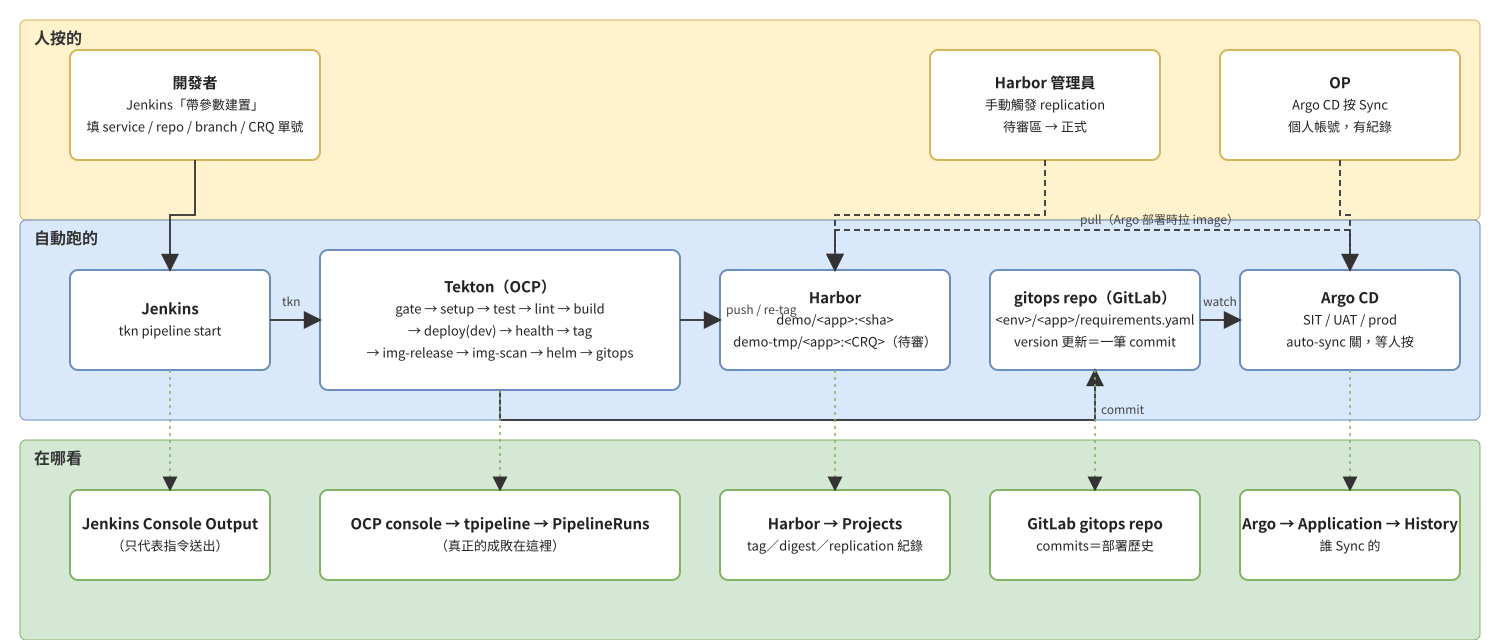
<p>企業裡的交付鏈通常是這樣的：開發者在 Jenkins 按「帶參數建置」，填一個變更單號；Jenkins 丟給 OpenShift 上的 Tekton；
Tekton 跑十來個 task 把 image 推進 Harbor；最後改一個 GitOps repo，等 OP 在 Argo 按 Sync。</p>

<p>問題是，<strong>用的人看不到中間</strong>。Jenkins 綠了就當成功，出事不知道先看哪，image 有三個 tag 不知道是不是同一顆。
而生產環境不能讓你按壞。</p>

<p>所以我把它搬到筆電上。同樣的參數名、同樣的 task 順序、同樣的 Harbor 待審區與手動 replication、同樣「Argo 不自動 sync」。
差別只有一個：按壞了 <code class="language-plaintext highlighter-rouge">make up</code> 重來。</p>

<h2 id="長什麼樣">長什麼樣</h2>

<p><img src="https://raw.githubusercontent.com/ryanGTR/ocp-pipeline-lab/main/docs/overview.png" alt="overview" /></p>

<table>
  <thead>
    <tr>
      <th>角色</th>
      <th>用什麼</th>
    </tr>
  </thead>
  <tbody>
    <tr>
      <td>叢集</td>
      <td>CRC（OpenShift Local）4.22 ＋ OpenShift Pipelines operator</td>
    </tr>
    <tr>
      <td>Git</td>
      <td>Gitea（代替 GitLab）：<code class="language-plaintext highlighter-rouge">demo-node</code>（程式）、<code class="language-plaintext highlighter-rouge">demo-gitops</code>（部署宣告）</td>
    </tr>
    <tr>
      <td>Registry</td>
      <td>Harbor 2.15，rootless podman-compose；project <code class="language-plaintext highlighter-rouge">demo</code> 與待審區 <code class="language-plaintext highlighter-rouge">demo-tmp</code>，手動 replication rule</td>
    </tr>
    <tr>
      <td>入口</td>
      <td>Jenkins，JCasC；job <code class="language-plaintext highlighter-rouge">node_build_pipeline</code>（<code class="language-plaintext highlighter-rouge">tkn pipeline start</code>）與 <code class="language-plaintext highlighter-rouge">scale_deployment</code>（<code class="language-plaintext highlighter-rouge">oc scale</code> 代理）</td>
    </tr>
    <tr>
      <td>Pipeline</td>
      <td>Tekton，task 改自 IBM Cloud-Native Toolkit v2.7.7</td>
    </tr>
  </tbody>
</table>

<p>一次 build：</p>

<div class="language-plaintext highlighter-rouge"><div class="highlight"><pre class="highlight"><code>gate → setup → test → dockerfile-lint → build → deploy → health → tag-release → img-release → img-scan → helm-release → gitops
</code></pre></div></div>

<p><code class="language-plaintext highlighter-rouge">gate</code> 是加的：變更單號格式不對（不是 <code class="language-plaintext highlighter-rouge">CRQ</code> + 12 碼）就整條不跑。其他十一個照上游。</p>

<h2 id="三個驗收題">三個驗收題</h2>

<p>這個 lab 的設計目標就是讓用的人能回答這三題：</p>

<ol>
  <li>從 Jenkins 按一次 build，在 OCP console 找到 PipelineRun，說出它卡在哪個 task。</li>
  <li>在 Harbor 找到剛建的 image，說出它有幾個 tag、為什麼 digest 一樣。</li>
  <li>說出「Jenkins 綠了但沒上線」要先看哪三個地方。</li>
</ol>

<p>第三題的答案牽涉 <a href="/2026/08/tkn-showlog-false-green/"><code class="language-plaintext highlighter-rouge">--showlog</code> 假綠</a>，
第二題牽涉放行流程：pipeline 只能把 image 放到 <code class="language-plaintext highlighter-rouge">demo-tmp</code>，管理員手動觸發 replication 搬進 <code class="language-plaintext highlighter-rouge">demo</code>，
結果是<strong>三個 tag（git sha、時間戳、變更單號）、一個 digest</strong>。放行換的是名字，不是內容。</p>

<h2 id="怎麼跑">怎麼跑</h2>

<div class="language-bash highlighter-rouge"><div class="highlight"><pre class="highlight"><code>git clone https://github.com/ryanGTR/ocp-pipeline-lab <span class="o">&amp;&amp;</span> <span class="nb">cd </span>ocp-pipeline-lab
make preflight                  <span class="c"># 缺什麼、怎麼補</span>
<span class="nb">cp </span>lab.env.example lab.env
make up                         <span class="c"># gitea → harbor → ocp → jenkins → check</span>
make build                      <span class="c"># Jenkins 觸發一次，等 Tekton 12/12</span>
make build <span class="nv">PUNCH</span><span class="o">=</span>CRQ123         <span class="c"># 故意填錯</span>
make promote <span class="nv">SRC</span><span class="o">=</span>&lt;git sha&gt; <span class="nv">PUNCH</span><span class="o">=</span>CRQ000000000200
</code></pre></div></div>

<p>有 CRC 的人大約十五分鐘看到第一條綠的；從零開始約一小時，多數時間在等 CRC 啟動與拉 image。
每支 script 都可以重跑。</p>

<h2 id="踩過的坑">踩過的坑</h2>

<p>做這個 lab 撞了二十一個坑，每個都會讓人多花半天：rootless Harbor 的 <code class="language-plaintext highlighter-rouge">log</code> service、JCasC 的 <code class="language-plaintext highlighter-rouge">readFileFromWorkspace</code>、
容器裡解不到 <code class="language-plaintext highlighter-rouge">api.crc.testing</code>、toolkit 的 registry 啟發式、<a href="/2026/08/buildah-without-privileged-on-openshift/">buildah 的 privileged</a>……
全部在 repo 的 <a href="https://github.com/ryanGTR/ocp-pipeline-lab/blob/main/docs/pitfalls.md">docs/pitfalls.md</a>，每條附解法。</p>

<h2 id="它不是什麼">它不是什麼</h2>

<ul>
  <li>不是生產架構。HTTP 的 Harbor、寫在 <code class="language-plaintext highlighter-rouge">lab.env</code> 的密碼、<code class="language-plaintext highlighter-rouge">insecure-skip-tls-verify</code>——全是為了在筆電上十五分鐘跑起來。</li>
  <li>沒有 Argo CD。lab 到「gitops repo 有新 commit」為止，因為重點是 pipeline 這一段；Argo 那一段在真實環境是 OP 按 Sync。</li>
  <li>不含任何特定組織的設定。task 名字、namespace、參數名都是通用的。</li>
</ul>

<p>repo：<a href="https://github.com/ryanGTR/ocp-pipeline-lab">github.com/ryanGTR/ocp-pipeline-lab</a></p>]]></content><author><name>Ryan Chen</name></author><category term="openshift" /><category term="tekton" /><category term="harbor" /><category term="jenkins" /><category term="gitops" /><category term="lab" /><summary type="html"><![CDATA[Jenkins 帶參數建置 → Tekton 11 個 task → Harbor → GitOps repo，加上變更單號閘門與人工放行。一台有 CRC 的機器，make up，十五分鐘。]]></summary></entry><entry><title type="html">OpenShift 上的 Tekton buildah 不需要 privileged：SCC、SETFCAP 與 vfs</title><link href="https://ryangtr.github.io/2026/08/buildah-without-privileged-on-openshift/" rel="alternate" type="text/html" title="OpenShift 上的 Tekton buildah 不需要 privileged：SCC、SETFCAP 與 vfs" /><published>2026-08-21T14:30:00+08:00</published><updated>2026-08-21T14:30:00+08:00</updated><id>https://ryangtr.github.io/2026/08/buildah-without-privileged-on-openshift</id><content type="html" xml:base="https://ryangtr.github.io/2026/08/buildah-without-privileged-on-openshift/"><![CDATA[<h2 id="現象">現象</h2>

<p>用 <a href="https://github.com/IBM/ibm-garage-tekton-tasks">IBM Cloud-Native Toolkit</a>（v2.7.7）的 <code class="language-plaintext highlighter-rouge">ibm-build-tag-push</code> 跑 build，
PipelineRun 停在 <code class="language-plaintext highlighter-rouge">build</code>，狀態 <code class="language-plaintext highlighter-rouge">PodAdmissionFailed</code>：</p>

<div class="language-plaintext highlighter-rouge"><div class="highlight"><pre class="highlight"><code>pods "node-pipeline-run-xxxxx-build-pod" is forbidden: unable to validate against any security context constraint:
  provider "pipelines-scc": .containers[0].privileged: Invalid value: true: Privileged containers are not allowed
</code></pre></div></div>

<p>看 task 的定義就知道為什麼：</p>

<div class="language-yaml highlighter-rouge"><div class="highlight"><pre class="highlight"><code><span class="pi">-</span> <span class="na">name</span><span class="pi">:</span> <span class="s">build</span>
  <span class="na">image</span><span class="pi">:</span> <span class="s">quay.io/buildah/stable:v1.15.0</span>
  <span class="na">securityContext</span><span class="pi">:</span>
    <span class="na">privileged</span><span class="pi">:</span> <span class="no">true</span>
</code></pre></div></div>

<p>上游 v2.7.7 裡 <code class="language-plaintext highlighter-rouge">privileged: true</code> 的 task：<code class="language-plaintext highlighter-rouge">build-tag-push</code>、<code class="language-plaintext highlighter-rouge">image-release</code>、<code class="language-plaintext highlighter-rouge">img-scan</code>（trivy）、<code class="language-plaintext highlighter-rouge">img-scan-trivy</code>、<code class="language-plaintext highlighter-rouge">operator-*</code>、<code class="language-plaintext highlighter-rouge">build-tag-push-ace-bar</code>。
前三個就在一條標準 pipeline 的路徑上。</p>

<h2 id="為什麼上游這樣寫">為什麼上游這樣寫</h2>

<p>buildah 在容器裡建 image 要做幾件平常容器不給做的事：建 user namespace、掛 overlay、設 file capabilities。
最省事的解法是 <code class="language-plaintext highlighter-rouge">privileged: true</code>，一次拿到全部。2020 年左右的 toolkit 就這樣寫了，一直沒改。</p>

<p>在 OpenShift 上這件事由 <strong>SCC（Security Context Constraints）</strong> 管。
OpenShift Pipelines operator 給 pipeline 的 SA 綁的是 <code class="language-plaintext highlighter-rouge">pipelines-scc</code>——它允許的比 <code class="language-plaintext highlighter-rouge">restricted</code> 多，但<strong>不含 privileged</strong>。
要跑 privileged 得平台管理員另外綁 <code class="language-plaintext highlighter-rouge">privileged</code> SCC 給那個 SA，等於把整個 pipeline namespace 的 build 都開成 root 等級。</p>

<h2 id="實際需要的只有兩樣">實際需要的只有兩樣</h2>

<div class="language-yaml highlighter-rouge"><div class="highlight"><pre class="highlight"><code><span class="pi">-</span> <span class="na">name</span><span class="pi">:</span> <span class="s">build</span>
  <span class="na">image</span><span class="pi">:</span> <span class="s">quay.io/buildah/stable:v1.15.0</span>
  <span class="na">securityContext</span><span class="pi">:</span>
    <span class="na">capabilities</span><span class="pi">:</span>
      <span class="na">add</span><span class="pi">:</span> <span class="pi">[</span><span class="nv">SETFCAP</span><span class="pi">]</span>
  <span class="na">env</span><span class="pi">:</span>
    <span class="pi">-</span> <span class="na">name</span><span class="pi">:</span> <span class="s">STORAGE_DRIVER</span>
      <span class="na">value</span><span class="pi">:</span> <span class="s">vfs</span>
</code></pre></div></div>

<ul>
  <li><strong><code class="language-plaintext highlighter-rouge">SETFCAP</code></strong>：buildah 解開 base image 時要把 file capabilities（例如 <code class="language-plaintext highlighter-rouge">ping</code> 的 <code class="language-plaintext highlighter-rouge">cap_net_raw</code>）寫回檔案。沒有這個 capability 會在解 layer 時出錯。<code class="language-plaintext highlighter-rouge">pipelines-scc</code> 允許加 <code class="language-plaintext highlighter-rouge">SETFCAP</code>。</li>
  <li><strong><code class="language-plaintext highlighter-rouge">STORAGE_DRIVER=vfs</code></strong>：overlay 在非 privileged 容器裡需要 fuse-overlayfs 或 kernel 支援 unprivileged overlay，兩者在 pod 裡都不保證有。<code class="language-plaintext highlighter-rouge">vfs</code> 用純複製，慢但一定能跑。</li>
</ul>

<p>改完以後 pod 的 annotation 是 <code class="language-plaintext highlighter-rouge">openshift.io/scc: pipelines-scc</code>，build 正常推進 Harbor。
lab 裡一個 22 MB 的 demo app，build 加 push 約 5 分鐘——vfs 的代價很明顯，每一層都是整份複製。教學 lab 可以接受；真要快就得談 fuse-overlayfs 或 kernel 的 unprivileged overlay。</p>

<h2 id="skopeo-根本不需要">skopeo 根本不需要</h2>

<p><code class="language-plaintext highlighter-rouge">image-release</code> 和 <code class="language-plaintext highlighter-rouge">img-scan</code> 的 skopeo step 也標了 <code class="language-plaintext highlighter-rouge">privileged: true</code>。
skopeo 只是 registry 到 registry 的複製，不建 image、不掛任何東西。把 <code class="language-plaintext highlighter-rouge">securityContext</code> 整段拿掉，照跑。</p>

<p>猜測是當初複製貼上 build task 的模板留下來的。這類「沿襲下來的 privileged」在老 task 庫裡很常見，值得逐一檢查。</p>

<h2 id="一個相關的坑toolkit-的-registry-啟發式">一個相關的坑：toolkit 的 registry 啟發式</h2>

<p>同一批 task 裡還有一段：registry host 含 <code class="language-plaintext highlighter-rouge">:</code>（有 port）就判定為 OpenShift 內建 registry，<strong>不帶帳密</strong>。
lab 的 Harbor 跑在 <code class="language-plaintext highlighter-rouge">host:8088</code>，結果 skopeo 匿名去拉 private project，<code class="language-plaintext highlighter-rouge">unauthorized</code>。
生產環境的 Harbor 通常走 443 沒有 port，不會中；lab 或任何非標準 port 的 registry 就會。
這段判斷在 lab 的 shim 裡直接拿掉了。</p>

<h2 id="在-lab-裡看">在 lab 裡看</h2>

<p><a href="https://github.com/ryanGTR/ocp-pipeline-lab">ocp-pipeline-lab</a> 的 <code class="language-plaintext highlighter-rouge">tekton/tasks/lab-build-tag-push.yaml</code> 是改過的版本，
<code class="language-plaintext highlighter-rouge">NOTICE</code> 列了相對上游的每一項改動。想重現原始錯誤：把 <code class="language-plaintext highlighter-rouge">capabilities</code> 換回 <code class="language-plaintext highlighter-rouge">privileged: true</code>，<code class="language-plaintext highlighter-rouge">make build</code>，看 <code class="language-plaintext highlighter-rouge">PodAdmissionFailed</code>。</p>]]></content><author><name>Ryan Chen</name></author><category term="tekton" /><category term="openshift" /><category term="buildah" /><category term="security" /><summary type="html"><![CDATA[IBM Cloud-Native Toolkit 的 build task 預設 privileged: true。在沒有 privileged SCC 的 SA 上會 PodAdmissionFailed；其實只要 SETFCAP 加 vfs storage driver 就能跑。]]></summary></entry><entry><title type="html">tkn pipeline start –showlog 會讓 Jenkins 永遠綠</title><link href="https://ryangtr.github.io/2026/08/tkn-showlog-false-green/" rel="alternate" type="text/html" title="tkn pipeline start –showlog 會讓 Jenkins 永遠綠" /><published>2026-08-21T14:00:00+08:00</published><updated>2026-08-21T14:00:00+08:00</updated><id>https://ryangtr.github.io/2026/08/tkn-showlog-false-green</id><content type="html" xml:base="https://ryangtr.github.io/2026/08/tkn-showlog-false-green/"><![CDATA[<h2 id="現象">現象</h2>

<p>Jenkins 的 job 長這樣，很多地方都這麼寫：</p>

<div class="language-groovy highlighter-rouge"><div class="highlight"><pre class="highlight"><code><span class="n">stage</span><span class="o">(</span><span class="s1">'Trigger Tekton'</span><span class="o">)</span> <span class="o">{</span>
  <span class="n">steps</span> <span class="o">{</span>
    <span class="n">sh</span> <span class="s1">'tkn pipeline start node-pipeline -n tpipeline -s pipeline --showlog \
          -p git-url=$csp_git -p git-revision=$git_revision ...'</span>
  <span class="o">}</span>
<span class="o">}</span>
</code></pre></div></div>

<p>Tekton 那邊 <code class="language-plaintext highlighter-rouge">build</code> 這一格紅了（推 image 失敗），Jenkins 的 build <strong>SUCCESS</strong>。
Console Output 裡其實看得到錯誤訊息，但沒人會去看綠色 build 的 log。</p>

<p>我在 lab 裡重現它只花了一次：把 Harbor 的 TLS 設定弄錯，Tekton 的 <code class="language-plaintext highlighter-rouge">build</code> task 在 <code class="language-plaintext highlighter-rouge">buildah login</code> 就死了，
Jenkins 照樣綠。</p>

<h2 id="原因">原因</h2>

<p><code class="language-plaintext highlighter-rouge">tkn pipeline start --showlog</code> 做兩件事：建 PipelineRun，然後<strong>跟著串 log</strong>。
它的 exit code 反映的是「log 串完了沒」，不是「PipelineRun 成功了沒」。
PipelineRun 失敗時 log 一樣會串完，所以 exit 0。</p>

<p>這不是 bug 而是設計：<code class="language-plaintext highlighter-rouge">tkn pipeline start</code> 是「啟動」指令，不是「等結果」指令。
但任何把它包進 CI 的人，直覺都會以為綠 = 成功。</p>

<h2 id="修法">修法</h2>

<p>從 <code class="language-plaintext highlighter-rouge">tkn</code> 的輸出抓 PipelineRun 名字，再自己問 Kubernetes：</p>

<div class="language-groovy highlighter-rouge"><div class="highlight"><pre class="highlight"><code><span class="n">sh</span> <span class="s1">'''tkn pipeline start node-pipeline -n tpipeline -s pipeline --showlog \
        --use-param-defaults -p ... 2&gt;&amp;1 | tee tkn.log'''</span>
<span class="n">sh</span> <span class="s1">'''PR=$(sed -n "s/^PipelineRun started: //p" tkn.log | head -1)
      ST=$(oc get pr "$PR" -n tpipeline \
           -o jsonpath="{.status.conditions[0].status}/{.status.conditions[0].reason}")
      echo "PipelineRun=$PR status=$ST"
      case "$ST" in True/*) ;; *) echo "PipelineRun 未成功"; exit 1;; esac'''</span>
</code></pre></div></div>

<p>兩個小坑：</p>

<ol>
  <li><code class="language-plaintext highlighter-rouge">tkn</code> 第一行輸出是 <code class="language-plaintext highlighter-rouge">PipelineRun started: node-pipeline-run-xxxxx</code>。<strong>別用 <code class="language-plaintext highlighter-rouge">awk '{print $3}'</code></strong>——在 Groovy 的三引號字串裡 <code class="language-plaintext highlighter-rouge">$3</code> 會被當成 Groovy 變數吃掉，拿到空字串。<code class="language-plaintext highlighter-rouge">sed</code> 沒這個問題。</li>
  <li>沒給的 optional 參數，<code class="language-plaintext highlighter-rouge">tkn</code> 會<strong>互動式詢問</strong>。Jenkins 沒有 TTY，直接 <code class="language-plaintext highlighter-rouge">Error: EOF</code>。所有參數明傳，再加 <code class="language-plaintext highlighter-rouge">--use-param-defaults</code> 保險。</li>
</ol>

<h2 id="怎麼確認你自己的環境有沒有中">怎麼確認你自己的環境有沒有中</h2>

<p>找一對同時間的 Jenkins build 和 PipelineRun：Jenkins SUCCESS、PipelineRun <code class="language-plaintext highlighter-rouge">Failed</code>。
有一對就是中了。不需要看 Jenkinsfile，結果會說話。</p>

<p>修完以後反向再驗一次：Tekton 12/12 綠、Jenkins 也要綠。我第一版的 <code class="language-plaintext highlighter-rouge">awk</code> 寫法就是反向壞掉——Tekton 全綠、Jenkins 因為抓不到名字而紅。<strong>兩個方向都對了才算修好。</strong></p>

<h2 id="更一般的版本">更一般的版本</h2>

<p>這是「fire-and-forget 包裝」的通病：任何 <code class="language-plaintext highlighter-rouge">xxx start</code>、<code class="language-plaintext highlighter-rouge">xxx trigger</code>、<code class="language-plaintext highlighter-rouge">xxx submit</code> 指令，
exit code 都只代表「送出去了」。包進 CI 時要問自己：<strong>我檢查的是送出，還是結果？</strong></p>

<p>在 lab 裡按一次看看：<a href="https://github.com/ryanGTR/ocp-pipeline-lab">ocp-pipeline-lab</a> 的 <code class="language-plaintext highlighter-rouge">make build</code>，Jenkins 的 <code class="language-plaintext highlighter-rouge">node_build_pipeline</code> job 已經帶狀態檢查；
把第二個 <code class="language-plaintext highlighter-rouge">sh</code> 拿掉再跑一次壞的 build，就能親眼看到假綠。</p>]]></content><author><name>Ryan Chen</name></author><category term="tekton" /><category term="jenkins" /><category term="openshift" /><summary type="html"><![CDATA[Jenkins 用 tkn 觸發 Tekton 是很常見的組合。--showlog 把 log 串回來很方便，但它不會把 PipelineRun 的失敗變成非零 exit code——Jenkins 看到的永遠是 SUCCESS。]]></summary></entry></feed>